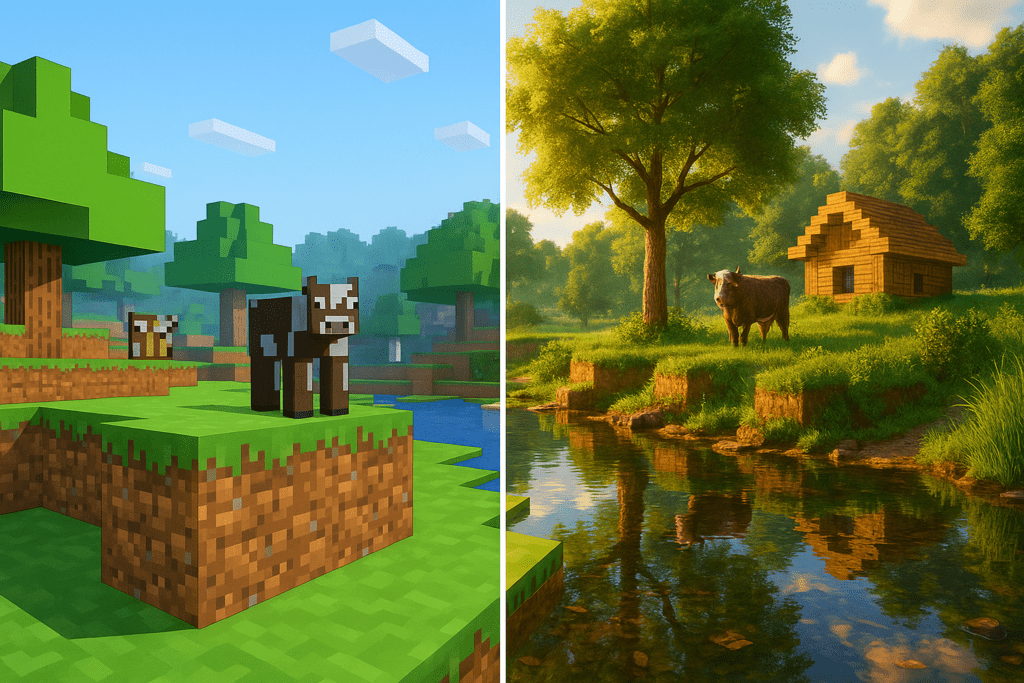
If you’ve ever dreamed of experiencing Minecraft as a jaw-droppingly realistic world, the Realistic MC Graphics modpack might just blow your mind—and your graphics card, if you’re not careful! In this guide, we’ll walk you through what the modpack does, what you’ll need to run it, and how to set it up safely for the best visual results.
Required Materials & Compatibility
- Minecraft Version: Java Edition 1.20.1
- Modloader: Forja
- OptiFine (HD U I5 required): Adds HD textures, shader support, and improved framerate. Learn more.
- Realism Mats Resource Pack: For Physically Based Rendering (PBR) and custom 3D blocks. Details here.
- High-End Shader (optional, for ‘Insane’ settings): SEUS PTGI HRR 2.1 test recommended. See shaders.
- Recommended Hardware (for high-end effects): NVIDIA RTX 4070 or AMD RX 7800 XT for flawless 1440p play.
- Where to Download: Only use reputable sources: CurseForge for the modpack and links.
Note: This modpack is community-made, not an official Mojang or Microsoft product. Always check compatibility before installing on modded worlds or servers.
What Does Realistic MC Graphics Actually Do?
This modpack combines a tested set of mods, ultra-HD texture packs, and popular shaders that collectively turn Minecraft’s familiar blocky world almost photorealistic. As creator bo_bo0 puts it:
“This modpack adds mods, texture packs and shaders that make Minecraft look realistic but still Vanilla, and thanks to performance mods it is actually playable.”
— bo_bo0, CurseForge
The included Realism Mats resource pack brings detailed PBR (Physically Based Rendering), which means textures bounce light just like in real life, and even introduces new 3D models for blocks. Top-end shaders like SEUS PTGI HRR 2.1 test add ray-traced lighting, deep shadows, and glimmering reflections. The final result: Minecraft as a modern realism simulator, without losing its legendary Vanilla vibe.
Guía de instalación paso a paso
1. Back Up Your Worlds
Before modding anything, make a copy of your current worlds. Navigate to your .minecraft/saves folder and duplicate your world folders to a safe location.
2. Install Minecraft Java Edition 1.20.1
This modpack targets Java Edition 1.20.1 only—make sure you’re running this version. Visit Minecraft.net if you need a fresh install.
3. Add Forge Mod Loader
Download the Forge installer for 1.20.1 de Forge’s official site. Run the installer and select “Install Client.”
4. Download and Install OptiFine (HD U I5)
Grab OptiFine (HD U I5)—critical for both advanced shader support and performance boosts. See this guide for step-by-step OptiFine help.
5. Add the Realistic MC Graphics Modpack
Desde el official CurseForge page, download the modpack ZIP. Use the CurseForge desktop app OR manually extract the contents to your .minecraft/mods directory.
6. Add the Realism Mats Resource Pack
For the best realism, install the Realism Mats pack into your resourcepacks folder. Follow the resource pack’s README for detailed setup steps.
7. Install and Configure Shaders (Advanced)
From the Minecraft Options menu, navigate to Video Settings → Shaders (thanks to OptiFine). Add your downloaded shader (e.g., SEUS PTGI HRR 2.1 test). For best results, use a modern GPU—older cards may struggle.
Performance and Hardware Tips
- For “Insane” settings with ray tracing, use at least an RTX 4070 or AMD RX 7800 XT for playable 1440p performance.
- If your PC struggles, turn down shader quality or try lower-res textures from the modpack options.
- OptiFine’s performance mods help, but realism settings are very demanding.
“OptiFine enhances Minecraft graphics and boosts FPS, adding HD textures and shaders support. Perfect for all devices, from low-end PCs to high-performance setups.”
— Wiki-Mine
Recap & What’s Next?
With over 50,000 downloads as of May 25, 2025, Realistic MC Graphics has become one of the community’s favorite ways to see Minecraft in a whole new light. Just remember: you’ll need OptiFine, Forge, and some serious hardware for all the eye-candy—but your screenshots will look jaw-dropping. Want to push things further? Check our Texture Packs collection o Mods hub for even more ways to customize your Minecraft experience!